Warnings & safety notices
The Warnings page collects every warning that will appear on the report so you can review, fine-tune, or add to them before publishing. Open it from the section sidebar or the command palette.
There are two kinds of warnings:
- Triggered warnings — generated automatically from your answers, based on rules built into the template. Warnings are built into the sample templates available to you without needing any configuration, but you can also build off of these sample templates, or create completely new templates with triggered warnings of any kind. See Using Templates.
- Custom warnings — ones you add yourself, whether or not they're tied to a form answer.
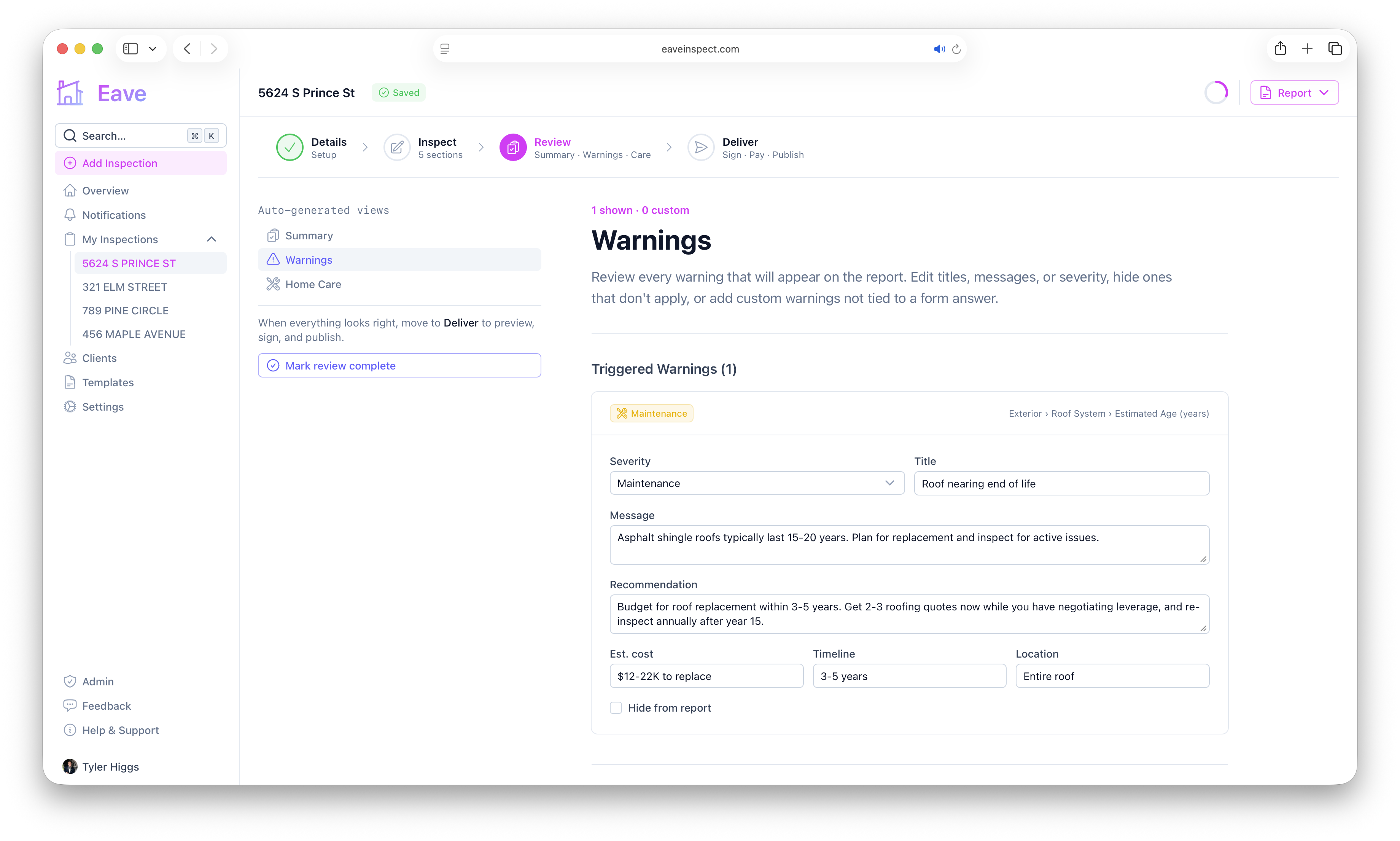
Triggered warnings
When an answer matches a warning rule on the template, a warning appears here automatically. Each card shows a severity badge (Safety, Health, Structural, Electrical, Fire, Maintenance, or Info) and a breadcrumb link back to the section › subsection › field that triggered it — click it to jump straight to that field.
You can refine any triggered warning:
- Severity, Title, and Message
- Recommendation (optional)
- Est. cost (e.g. "$1–3K"), Timeline (e.g. "1–2 years"), and Location (e.g. "Entire roof")
- Hide from report — keep the warning out of the report without deleting the rule
Edited warnings show a Modified badge; hidden ones show a Hidden badge. Use Reset to defaults to revert your edits.
Adding a custom warning
Click Add Custom Warning to write one from scratch. Set the severity, a title (required), and a message, plus optional recommendation, cost, timeline, and location. You can attach it to a specific section and subsection, or leave it general. Remove a custom warning with the trash button.
Severity grouping
Severities are grouped on the report into Critical, Moderate, Minor, and Informational. The reference at the bottom of the page shows exactly how each severity maps.
Stale overrides
If you edited a warning and later changed the answer (or the template removed the rule), your edit moves to Stale Overrides so it isn't lost. Click Remove to discard any override you no longer need.