Your AI assistant can now help build templates and fill in reports
When we first connected AI assistants to Eave, they could only read. We said anything more would be opt-in. Here's the more.
Two new permissions
When you connect an assistant, the consent page now has two checkboxes, both off unless you tick them:
- Edit your templates. Your assistant can create a template (empty, or a copy of one of yours or a sample) and add, change, move or remove its sections, questions, findings and comment library entries. Try "Add a Pool & Spa section to my standard template, with the usual findings."
- Work on your inspections. Your assistant can start draft inspections, fill in answers, add, edit or hide findings, write the summary and final comments, and fix the address, clients and buyer's agent. Try "Here are my roof notes. Fill in the Roof section for 12 Oak Lane."
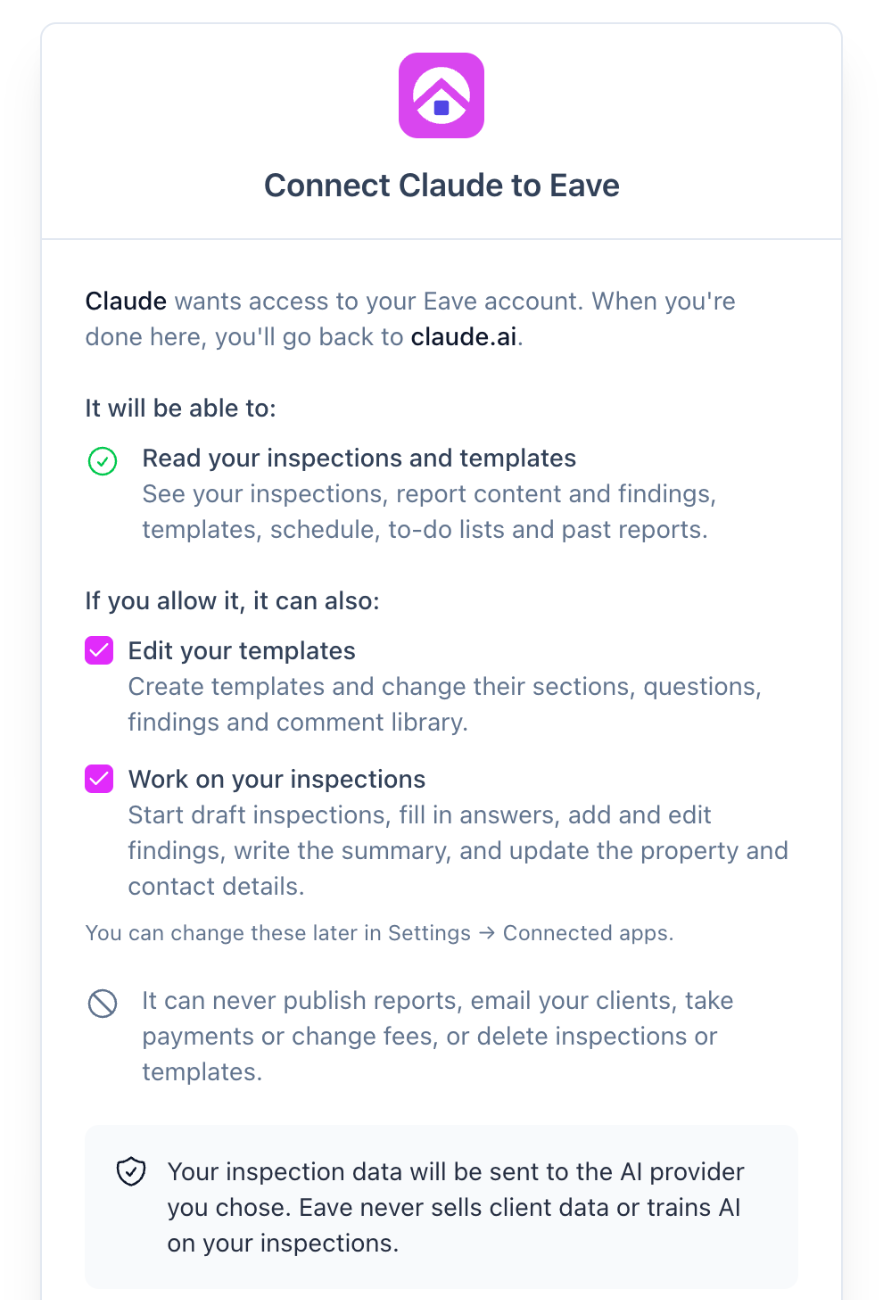
Already connected? Your connection stays read-only until you switch these on under Settings → You → Connected apps.
You stay in charge
A connected assistant still can't publish a report, email your clients, change the scheduled time, fees or payments, or delete an inspection or a template. A published, locked report stays locked, and in an organization your assistant can only do what your role allows.
Every change it makes is listed under Connected apps → Recent changes, with a link to what changed. Template changes only apply to inspections you start afterwards.
The details, including what to ask, are in Connect Claude or ChatGPT to Eave.
Your assistant still won't crawl the attic for you, but it will happily type up what you found up there.